

Window Reaction Scene: Build a Four-Beat Shot Brief
Plan a window reaction scene with a four-beat shot card and review the portrait, camera direction, hands and curtain movement.
What's new on this page
- 2026-10-29 — Page published. Clarified the guide’s search focus, added a practical FAQ and replaced the embedded video with an image.
A window reaction scene needs a readable setup, recognition, pause and ending. Use the four-beat card below to connect those actions before refining the prompt or judging a result.
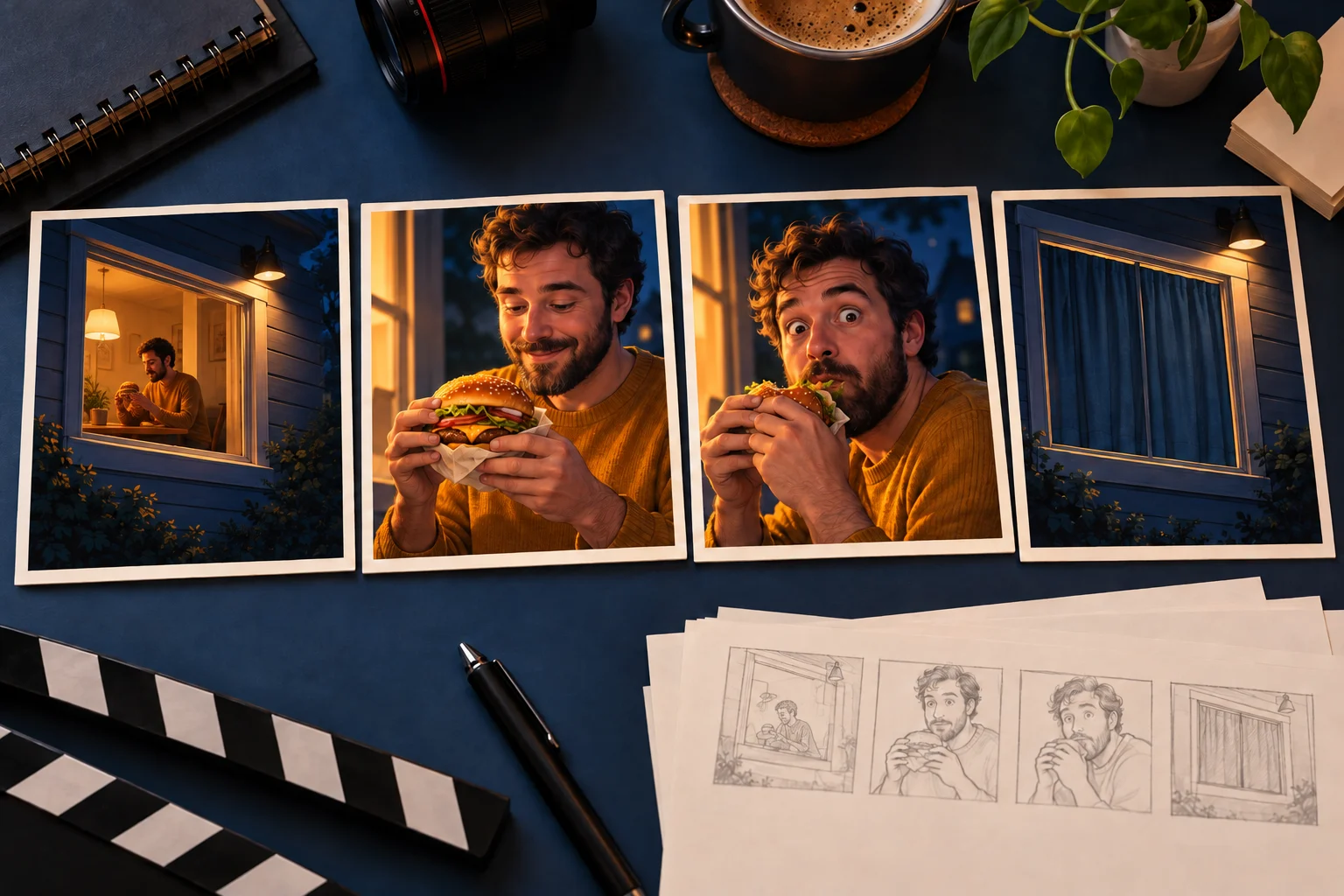
A window reaction is a short visual joke: someone enjoying a snack realizes the camera is watching, holds the look, and ends the encounter with the curtain. Before making a version, separate those actions into a shot brief. That gives you something concrete to review instead of asking for an unspecified “viral” result.
This guide provides a four-beat planning card and a review method for an AI interpretation of the scene. The accompanying illustration supports the planning exercise; it does not promise that a model will reproduce every beat.
Window reaction scene: write the four-beat card first
Use one line for what the viewer sees and one for what must remain stable. A useful fictional example is a person in a mustard sweater having a quiet late dinner. The sweater is an identity cue; the dinner is the situation; the pause is the joke.
-
Beat: Establish; Visible action: The camera faces an illuminated apartment window; Check before accepting the clip: The person is inside, and the viewer understands the viewing direction
-
Beat: Interrupt; Visible action: The person stops eating and notices the camera; Check before accepting the clip: The burger and both hands remain plausible
-
Beat: Hold; Visible action: The person looks back without a large new gesture; Check before accepting the clip: The face stays recognizable and the look lasts long enough to register
-
Beat: End; Visible action: The person reaches for the curtain and closes the encounter; Check before accepting the clip: The movement follows the room layout and has a readable finish
The four-beat card is a creative brief, not a required timing preset. Keep the order, then choose a duration offered by the workflow you actually use. Avoid assigning exact seconds before you know which output lengths are available.
Distinguish a scene template from a general video prompt
Check whether your selected workflow uses a prepared scene or a general video prompt. A general generator may ask for a prompt, an image, or a supported video reference. Prepare the inputs its current mode actually accepts.
Open the Higgfield video workspace and inspect the selected mode before preparing your inputs. If you use a reference workflow, check what that specific mode accepts. A still image can communicate the person's appearance; it does not, by itself, provide a recorded camera move or an exact curtain action.
Do not hide that distinction inside an elaborate prompt. Write down which input is responsible for identity and which is responsible for action. If the chosen workflow offers no video-reference input, treat the action brief as an interpretation request, not a motion transfer.
Keep the portrait useful for the shot
Choose a picture with an easily visible face, a single main person, and enough of the upper body to communicate the outfit. Avoid hands covering the eyes or a crop that removes most of the head. The planned scene involves eating, looking and reaching, so a source that already obscures the face adds another complication.
You do not need to photograph someone holding a burger simply to make the brief understandable. If you do use a prop in the input, inspect whether it hides the jaw or creates an ambiguous hand shape. Keep a clean original so you can return to it when comparing another version.
A concept still can be a separate planning stage in your preferred image editor. Use it to explore composition before committing to motion. Approving a still establishes only that image; it does not prove the face or room will remain stable in a video.
Use a short prompt with clear relationships
Here is an original suggested brief for a fictional scene:
View an illuminated apartment window from outside at night. Inside, one adult in a mustard sweater sits at a table with a burger. The person notices the camera, pauses with a deadpan expression, then reaches toward the curtain to end the encounter. Keep the room layout, face and clothing consistent. Use a restrained camera approach and leave the reaction easy to read. No on-screen text.
Adapt the wording to the selected mode and any reference material you provide. Remove instructions that contradict the reference. A shot cannot simultaneously maintain a locked exterior viewpoint and cut between several interior close-ups without changing the intended structure.
Review one failure at a time
Watch the result once without pausing. Can you identify all four beats? Then replay it slowly and inspect the hand-to-burger contact, eye direction and curtain movement. These are separate questions: a visually attractive frame can still lose the action sequence.
If the camera seems to enter the room, clarify the exterior viewpoint. If the person keeps eating without noticing the viewer, simplify the prompt around the pause and eye contact. If the curtain starts on one side and ends on the other, describe its position consistently. These are suggested revisions to the brief, not tested fixes for every model.
Keep the original input, prompt and chosen settings beside each saved result. Change one important instruction at a time so a comparison remains useful. Check the live quote before requesting another generation; the pricing page explains purchasing options, while the active workflow supplies the applicable generation quote.
Finish by choosing a cover frame and adding a caption in your publishing editor. The viewer should understand the window scene before the caption explains the joke. That is the final purpose of the four-beat card: a clip that communicates its setup, interruption, pause and ending in one viewing.
Frequently asked questions
What are the four beats in a window reaction scene?
Establish the scene, show the moment of recognition, allow a readable reaction and finish with a clear closing action. Adapt the timing to the actual clip instead of assuming a fixed duration.